- Core Rules: Races
- Supplemental races available (gnomes, half humans, monsters, etc.)
- Core Rules: Classes
- Supplemental classes available (assassins, barbarians, druids, illusionists, necromances, rangers, paladins, scouts, etc.)
E.g. a level 1 fighter has a Death Ray saving throw of 13. If the character is a dwarf (dwarfs have a +4 to Death Ray saves) then the Death Ray saving throw will be 9.
- (Recommended) Use the Equipment Packs Supplement and add items from the "Basic Pack" and one class pack of your choice. Feel free to spend any leftover money on bonus packs. OR
- Follow instructions at Core Rules: Equipment to roll for starting gold (3d6 * 10gp) and purchase equipment.
Write your equipment down in the character sheet's equipment slots. Decent-sized items like weapons and armor take up a slot. Smaller items like torches can fit a stack per slot. If you have any questions, ask the GM. See image for example:
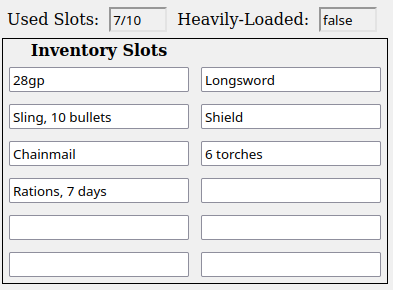
Your character can carry 10 slots without any penalties and may carry up to a maximum of 12 slots. Carrying more than 10 slots reduces your character's movement speed by 10ft.
- weapon_ab = class_ab (always +1 at level 1) + modifier (STR mod if melee or DEX mod if ranged)
- damage = weapon_damage + modifier (STR mod if melee or DEX mod if ranged)
- Slings and thrown weapons use STR instead of DEX.
- Halflings get +1 AB on ranged attacks.
- AB means attack bonus.
- Armor Class = armor_ac + shield + dex_mod
- Find the AC of your armor in Core Rules: Armor.
- If you are using a shield add 1.